Quick Block Reporting: Stop Contact in Seconds, Not Minutes
Quick Block Reporting: Stop Contact in Seconds, Not Minutes
Use Block & Report from any profile or chat window: two to three taps stops contact and alerts Trust & Safety at the same time. Anonymous reporting means your identity stays hidden from the person you report, and you can attach screenshots before you back out of the conversation.
Here is the fast path:
- Open the profile or chat, tap the menu, and select Block & Report.
- Choose the category that fits (harassment, scam, underage, non-consensual media, threat).
- Attach a screenshot if you have one, then submit.
Keep your evidence saved somewhere private before you leave the thread.
TL;DR:
- Attaching evidence such as screenshots and timestamps accelerates investigation and helps moderators assess reports more accurately.
- Categorizing reports correctly as harassment, scam, or threats ensures faster response times, especially for life-threatening incidents.
- Using the fast reporting steps—two to three taps from profile or chat—encourages more users to report harmful behavior promptly.
- Verified profiles and mutual-interest messaging systems significantly reduce the volume of unsolicited contact needing reporting.
- Immediate actions like unmatching, tightening privacy settings, or revoking permissions help protect personal safety after an incident.
Table of Contents
- How to Do Quick Block Reporting in Under a Minute
- When Should You Block Only vs. Block and Report?
- What Should You Include in a Block Report?
- What Happens After You Submit a Report?
- What Should You Do Right After an Incident?
- How SwingersUK’s Verification Reduces the Need to Report
- Why Fast, Factual Reporting Protects Everyone
- Get the Safety Tools That Make Fast Reporting Easier
- Key Takeaways
- Sources
How to Do Quick Block Reporting in Under a Minute
Speed matters here. A reporting flow reachable in 2 to 3 taps measurably increases how often people actually report bad behavior instead of just closing the app and hoping the problem goes away. SwingersUK builds its Block & Report tool around that same principle.
From a profile:
- Open the member’s profile and tap the three-dot menu in the top corner.
- Select Block & Report rather than Block alone if the behavior broke a rule.
- Pick the category that matches what happened, then attach a screenshot of the profile or bio if it’s relevant.
- Submit. The block takes effect immediately, even before the report finishes processing.
From a chat thread:
- Long-press or tap the specific message that crossed a line.
- Select Report Message to flag that exact exchange, with the option to block in the same step.
- Or open the chat menu directly and choose Block & Report to cover the whole conversation, not just one message.
- Use the anonymous reporting field to add context. It never gets shared with the reported member.
Reporting an image works the same way. Tap the photo, choose Report, and the timestamp and thread context attach automatically so moderators see exactly when and where it appeared.
Pro Tip: Screenshot the full conversation before you block, not after. Once you block someone, some platforms restrict your ability to reopen that thread, and you lose easy access to the evidence.
When Should You Block Only vs. Block and Report?
Not every uncomfortable interaction needs a formal report. Blocking alone is fine when someone is simply not your type, sends messages that feel pushy but stay within the rules, or you just want to end contact without escalating.
Reporting matters when the behavior crosses into territory the platform’s rules exist to prevent:
- Harassment, threats, or repeated unwanted contact after you’ve said no.
- Scam attempts, requests for money, or off-platform financial pressure.
- Underage users or suspicious age misrepresentation.
- Non-consensual sharing of photos or video.
Platforms actively discourage false or exaggerated reports because they burden moderation teams and slow down real cases, so stick to the facts of what happened. If there’s any hint of a physical threat or coercion, don’t weigh it carefully. Report immediately and treat your safety as the priority, not the moderation workload.
What Should You Include in a Block Report?
A report with the right details gets reviewed faster and acted on more accurately. Moderators need context, not just a complaint.
- Correct category: harassment, scam, underage user, non-consensual media, or physical threat.
- Screenshots with timestamps: the exact moment matters when investigators reconstruct a timeline.
- Profile link or user ID: this confirms you’re reporting the right account, especially if someone has a common display name.
- Message thread context: a single line out of context can look harmless when the full exchange tells a different story.
- Off-platform details: if the person pushed you to WhatsApp, Snapchat, or asked to meet somewhere specific, note it.
Academic research on dating app safety systems finds that attaching evidence and picking a precise category consistently speeds up investigation accuracy compared with vague, text-only complaints. Keep a private copy of everything you submit. Don’t post screenshots publicly, even to warn others. That can create legal exposure for you and compromise the case.
What Happens After You Submit a Report?
Expect an acknowledgement almost immediately, often with a reference number you can quote if you need to follow up. That confirmation alone builds trust that your report didn’t vanish into a queue.
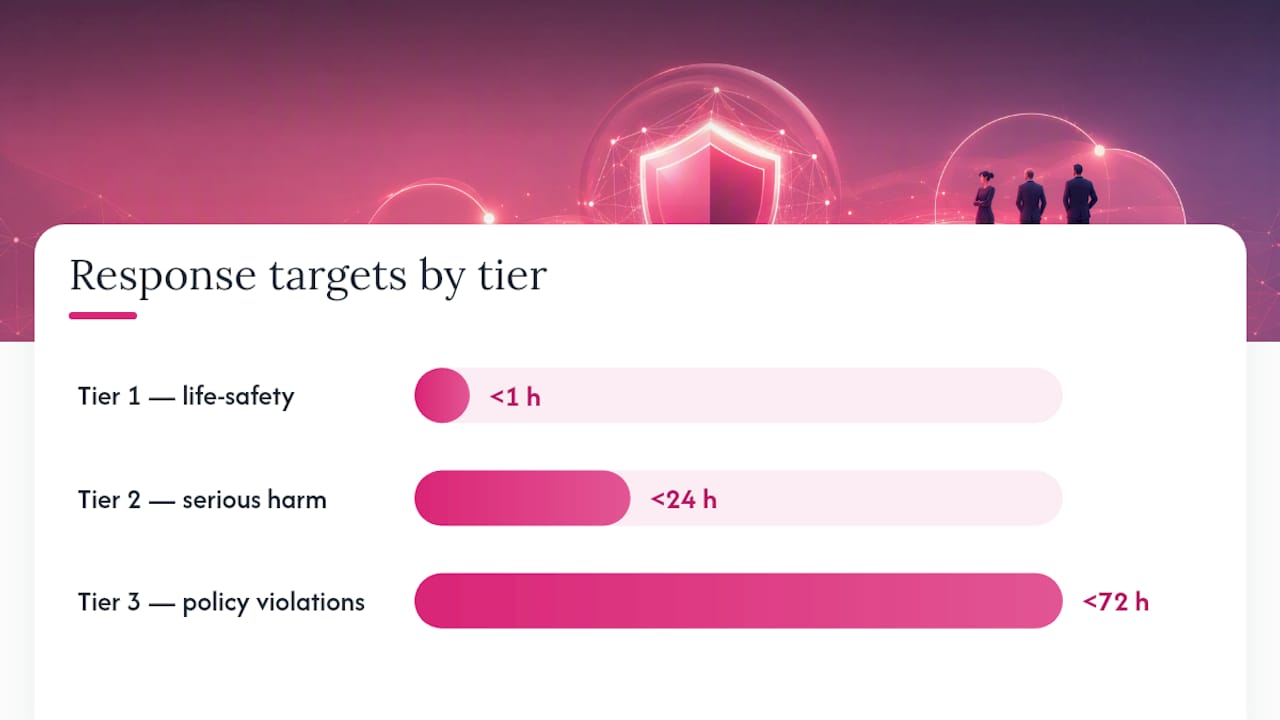
Response times generally follow severity tiers, and a well-run platform tracks them closely:
- Tier 1 (life-safety concerns, explicit threats): under 1 hour.
- Tier 2 (serious harm, harassment, scams): under 24 hours.
- Tier 3 (general policy violations): under 72 hours.
This structure comes from industry best-practice guidance on reporting and blocking systems, which finds tiered queues with target windows improve both accuracy and member trust. Outcomes vary depending on what investigators find: a warning, restricted messaging privileges, a temporary suspension, a permanent ban, or in serious cases, referral to law enforcement.
If a genuine safety threat is unfolding right now, contact emergency services directly rather than waiting on a platform response. Ofcom’s guidance for dating and social discovery services calls for quick takedown of illegal content and accessible complaint tools as baseline expectations, not bonus features.
What Should You Do Right After an Incident?
Blocking and reporting handle the platform side. Your personal exposure needs a few more minutes of attention.
- Unmatch or hide your profile from the reported user’s visibility if the option exists.
- Turn on incognito mode or tighten your discoverability settings so fewer people can find you while things settle.
- Check any photos you shared for embedded location metadata, and review social links attached to your profile.
- Change your password if you ever shared account details, and revoke any third-party app permissions tied to your profile.
If the person knows where you live, work, or plan to be, treat that as an escalation, not a footnote.
Pro Tip: Never agree to an in-person meeting with someone you’ve just reported, even if they apologize and ask to “clear things up.” Let the platform’s process run its course.

Guidance from RAINN’s online dating safety resources echoes this: never share banking details or passwords with someone you meet online, and report scam attempts to both the platform and the relevant authorities.
How SwingersUK’s Verification Reduces the Need to Report
Prevention beats cleanup. SwingersUK pairs AI and human ID verification with the Pulse Handshake system, which requires mutual interest before anyone can message you. That single design choice cuts down the volume of unsolicited contact that usually triggers a block or report in the first place.
- Verified profiles mean fewer fake accounts and bot-driven harassment attempts.
- Mutual messaging means you’re not fielding cold messages from people you never expressed interest in.
- Fewer low-value contacts mean the reports that do come through carry a clearer signal, which helps moderators prioritize genuine safety concerns.
A platform where every message requires two-sided interest naturally filters out the volume of noise that makes reporting systems feel overwhelmed elsewhere.
For members who want the mechanics, SwingersUK’s ID verification process explains how identity checks work, and the admin activity reporting page details how moderation reviews flow behind the scenes.
Why Fast, Factual Reporting Protects Everyone
Block & Report only works as a community tool when people use it honestly. I’d argue the biggest failure mode isn’t slow moderation. It’s members sitting on a real problem for days because they weren’t sure it “counted,” or firing off exaggerated reports over minor friction. Neither serves you well.
Use blocking freely for anything that just feels off. Save formal reports for actual rule violations, and stick to facts, not interpretation, when you write them. When a situation feels complicated, SwingersUK’s community guidelines spell out where the lines actually sit.
— Daniel
Get the Safety Tools That Make Fast Reporting Easier
A platform is only as safe as its weakest verification gap, and that’s exactly where SwingersUK draws its line differently. Instead of leaving you to sort real matches from fake profiles and unsolicited messages, SwingersUK verifies members through AI and human review before they can contact you at all, and the Pulse Handshake system means messaging only opens once interest is mutual.
That combination means fewer situations ever reach the point of needing Block & Report, and when you do need it, the tool sits two to three taps away with anonymous submission built in. If you’re evaluating platforms based on how seriously they take member safety, start with SwingersUK’s verified community, check what ID verification unlocks for your profile, and review the membership options that include enhanced privacy controls like incognito mode.
Key Takeaways
Fast, factual reporting combined with verified membership and mutual-interest messaging is the most reliable way to reduce harassment and resolve incidents quickly.
| Point | Details |
|---|---|
| Block & Report in 2 to 3 taps | Use the profile or chat menu to stop contact and notify moderators in one motion. |
| Match the category to the behavior | Select harassment, scam, underage, non-consensual media, or threat accurately for faster review. |
| Attach evidence before you block | Screenshots, timestamps, and profile IDs speed up investigation accuracy. |
| Expect tiered response times | Life-safety issues get under 1 hour; serious harm under 24 hours; policy violations under 72 hours. |
| Verification reduces incidents upfront | SwingersUK’s ID checks and Pulse Handshake system limit unsolicited contact before it starts. |
Sources
For platform-specific screenshots and live reporting steps, consult Bumble’s reporting guidance, Ofcom’s online safety rules for dating services, and RAINN’s online dating safety tips. Each platform’s own help center carries the most current, exact interface steps.
- Reporting someone – Bumble Support
- Reporting and blocking best-practice guide
- Dating apps and safety — academic analysis
- Ofcom: Dating and social discovery — online safety risks and rules