
Minutes to 2 Weeks: UK Profile Approval Time, Why Slower Means Safer
Minutes to 2 Weeks: UK Profile Approval Time, Why Slower Means Safer
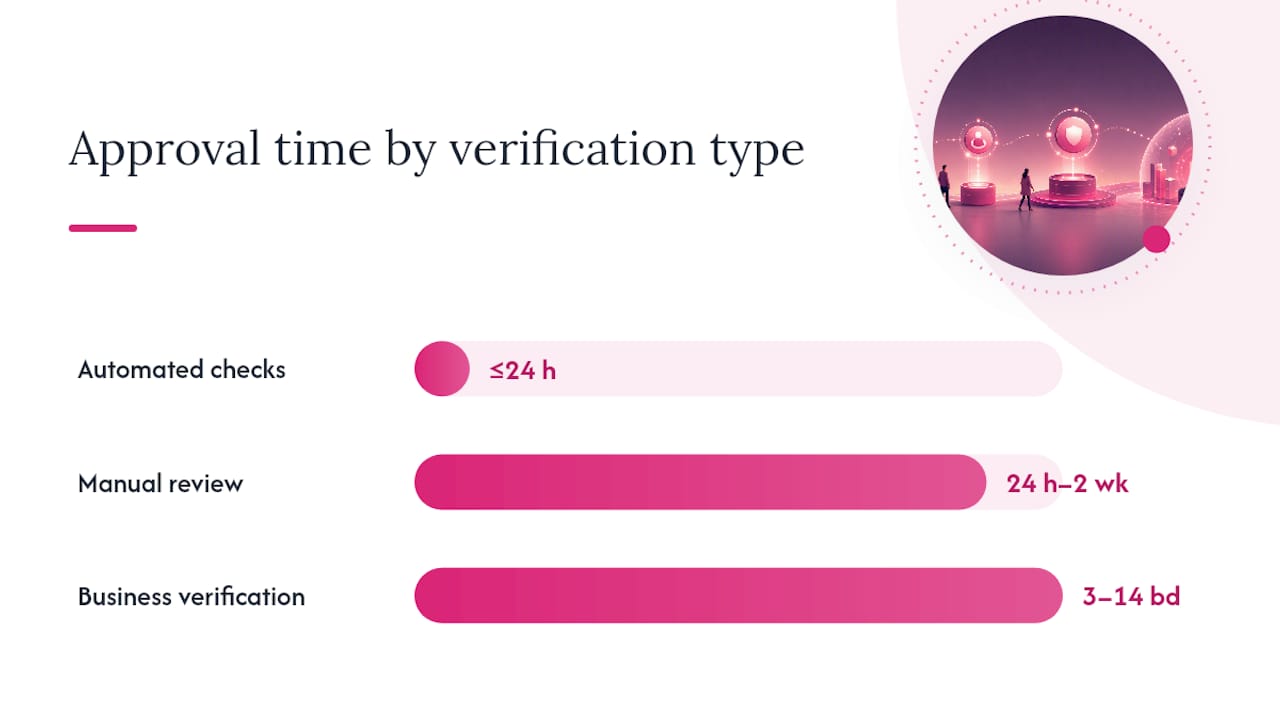
Most automated checks clear in minutes to 24 hours, while manual reviews typically run 1 to 10 business days, and complex business verifications can stretch beyond two weeks. Where your profile lands on that scale depends on how much of the process is handled by software versus a human reviewer. The sections below break down why, with real platform timelines and steps to shave days off your wait.
TL;DR:
- Automated checks usually complete within a few minutes to 24 hours, but manual reviews can take from one to two weeks depending on workload and complexity.
- Profiles flagged for mismatched information, suspicious images, or unclear documents are routed to human reviewers, significantly increasing review time, especially outside business hours or across time zones.
- Platforms handling sensitive verification, such as business or high-trust communities, tend to have longer wait times due to additional manual or content moderation steps.
- Following upload instructions precisely, matching ID details, completing all profile fields, and monitoring notifications can help speed up approval and reduce delays.
- Using priority processing is effective only when an urgent need exists; otherwise, stricter or more manual platforms generally take longer but offer better security.
Table of Contents
- Profile Approval Time by Verification Type
- Why Approvals Take Time: Automated Checks, Queues, and Risk Flags
- Real Platform Examples and Their Published Timelines
- How to Speed Up Approval: A Checklist for Today
- What to Do If Your Profile Approval Is Delayed or Rejected
- How Swingersuk Handles Verification Speed and Safety
- Realistic Expectations While You Wait
- Get Verified and Start Connecting on Swingersuk
- Sources
- FAQ
Profile Approval Time by Verification Type
Not every profile goes through the same pipeline, and that’s the biggest reason wait times swing so widely from one platform to the next. A dating app checking a selfie against an ID photo runs a very different process than a marketplace verifying a registered business.
Here’s how the ranges typically break down:
- Automated checks: Under 5 minutes to 24 hours in most cases
- Manual photo or document review: 24 hours to 2 weeks, with 1 to 10 business days being typical
- Business or professional verification: 3 to 14+ business days depending on how many compliance checks apply
- Priority or expedited processing: Certain platforms offer faster reviews for users with urgent needs
Automated verification (selfie scans, biometric matching, instant ID checks) often finishes in under five minutes, though Getaround’s own guidance notes it can take up to 24 hours in some cases. Manual review is a different animal entirely. When a human has to step in, whether because a document looks unclear or a photo fails an automated match, that same profile can sit in queue for days. In rare cases involving repeated staff intervention, Getaround reports waits stretching as long as 30 days.
The gap between “minutes” and “weeks” isn’t random. It maps directly to how much of the review a machine can finish on its own versus how much requires a person to look, judge, and decide.
Why Approvals Take Time: Automated Checks, Queues, and Risk Flags
Most platforms run a tiered system. Software handles the first pass, screening for basic matches (does the face match the ID, does the document look genuine, does the name match the account) and clearing the straightforward cases instantly. Anything that doesn’t pass cleanly gets kicked upstairs to a human reviewer, and that’s where your timeline changes completely.
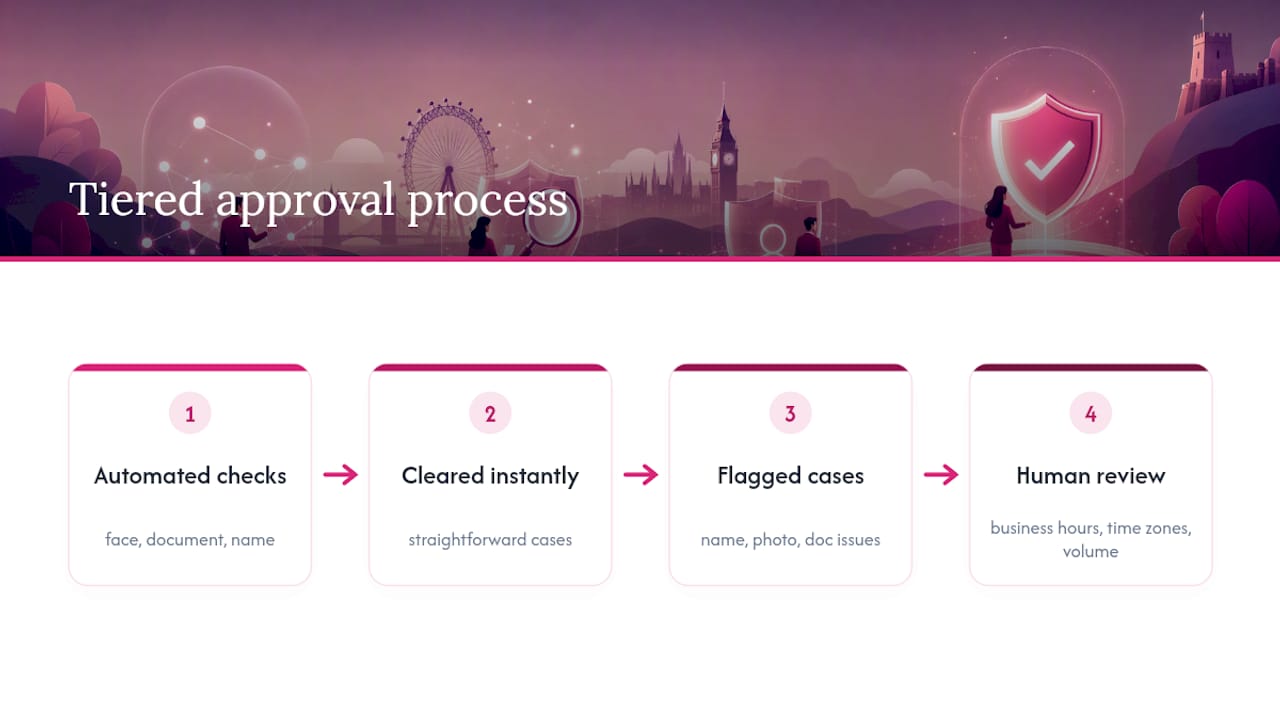
Certain signals almost guarantee a manual detour. A mismatched name between your ID and your account, a photo that shows signs of editing or filtering, or a document with poor lighting or cropped edges will all trigger a second look. Getaround’s help documentation confirms this pattern directly: a failed automated check routes the profile to a manual queue, and processing time typically increases significantly.
Staffing plays a bigger role than most users expect. Manual review teams work business hours, so a submission that lands Friday evening often doesn’t get touched until Monday. Time zones compound this further. A platform based in one region reviewing a submission from another can add a full day just to hand-off shifts, even before anyone looks at your file.
Niche and adult-oriented communities add another layer entirely. Beyond identity checks, these platforms typically run content moderation and community-standard reviews to keep the space safe and consent-driven. That extra step protects the community, but it does mean the review touches more hands, and every extra hand adds time.
Volume matters too. A platform running a promotional push or seasonal spike sees its manual queue lengthen, which pushes everyone’s wait time up regardless of how clean their submission is.
Real Platform Examples and Their Published Timelines
Published help-center timelines give you a useful benchmark for what “normal” actually looks like, because platforms rarely advertise these numbers unless they’re confident in them.
- Microsoft Partner Center: business partner verification runs 3 to 5 business days, a solid reference point for what a formal business check looks like end to end.
- Google Business Profile: video-based verification can take up to five working days to review the uploaded footage, since a human has to actually watch it.
- Rover: sitter profile review is typically 5 to 10 business days, a high-touch example given how much trust a pet-sitting marketplace has to establish before matching strangers with someone’s home and animals.
- Getaround: most driver profiles verify automatically within minutes, but manual review can take up to 24 hours or more when a case needs closer attention. The platform also offers priority processing for drivers with an imminent booking.
- Hinge: selfie-based biometric verification typically clears in under 24 hours, and per Hinge’s own policy, the biometric templates used for the check are deleted shortly after verification completes.
Line these up and a pattern emerges. Platforms handling money, safety, or in-person trust (Rover, Microsoft partners) lean manual and take longer. Platforms verifying a single identity claim against a live selfie (Hinge, Getaround’s automated tier) lean automated and move fast. Your wait time is really a reflection of how much risk the platform is trying to manage before it lets you interact with other people.
How to Speed Up Approval: A Checklist for Today
You can’t control a platform’s staffing levels, but you control almost everything else that determines whether your profile clears on the first pass or gets bounced into a slower queue.
- Follow the upload instructions exactly. File type, resolution, and format requirements exist for a reason. An unedited, unfiltered photo taken in good lighting clears automated checks far more reliably than a cropped or touched-up image.
- Match your ID to your account details. Your name, and often your address, should match precisely what you entered when signing up. A mismatch is one of the fastest ways to trigger manual review.
- Complete every profile field before you submit. Optional verification steps you skip now often become required follow-ups later, adding a full review cycle to your wait.
- Check your email and account dashboard daily. Platforms almost always notify users when something additional is needed, and Rover’s own support documentation confirms incomplete submissions are one of the leading causes of delay.
- Use expedited or priority options only when your need is genuine. If a platform offers fast-track review for an imminent booking or start date, that’s the moment to use it, not as a default shortcut.
Pro Tip: Before you upload anything, reread the platform’s media guidelines twice. Reviewers reject far more profiles for a blurry photo or a cropped ID corner than for anything actually suspicious about the person behind them.
What to Do If Your Profile Approval Is Delayed or Rejected
A “pending” status usually means one of two things: the platform is still working through its queue, or it’s waiting on you for something. Dashboard banners and progress indicators are your most reliable clue for which one applies. Rover’s own guidance backs this up directly, treating those UI cues as the clearest signal of where a case actually stands.
If a few days pass without movement, here’s how to escalate properly:
- Check for banners or notification prompts first. These often explain exactly what’s missing before you need to contact anyone.
- Gather your details before reaching out to support. Have your account ID, the date you submitted, and screenshots of any error messages ready.
- Ask specifically what failed. A vague “please review my account” ticket takes longer than one that says which document or photo triggered the hold.
- Expect a resubmission window of roughly 2 to 7 business days for most appeals, though this varies by platform and case complexity.
- Check the platform’s status page or social channels if delays seem widespread. A systems outage explains a stalled queue far better than anything about your specific submission.
How Swingersuk Handles Verification Speed and Safety
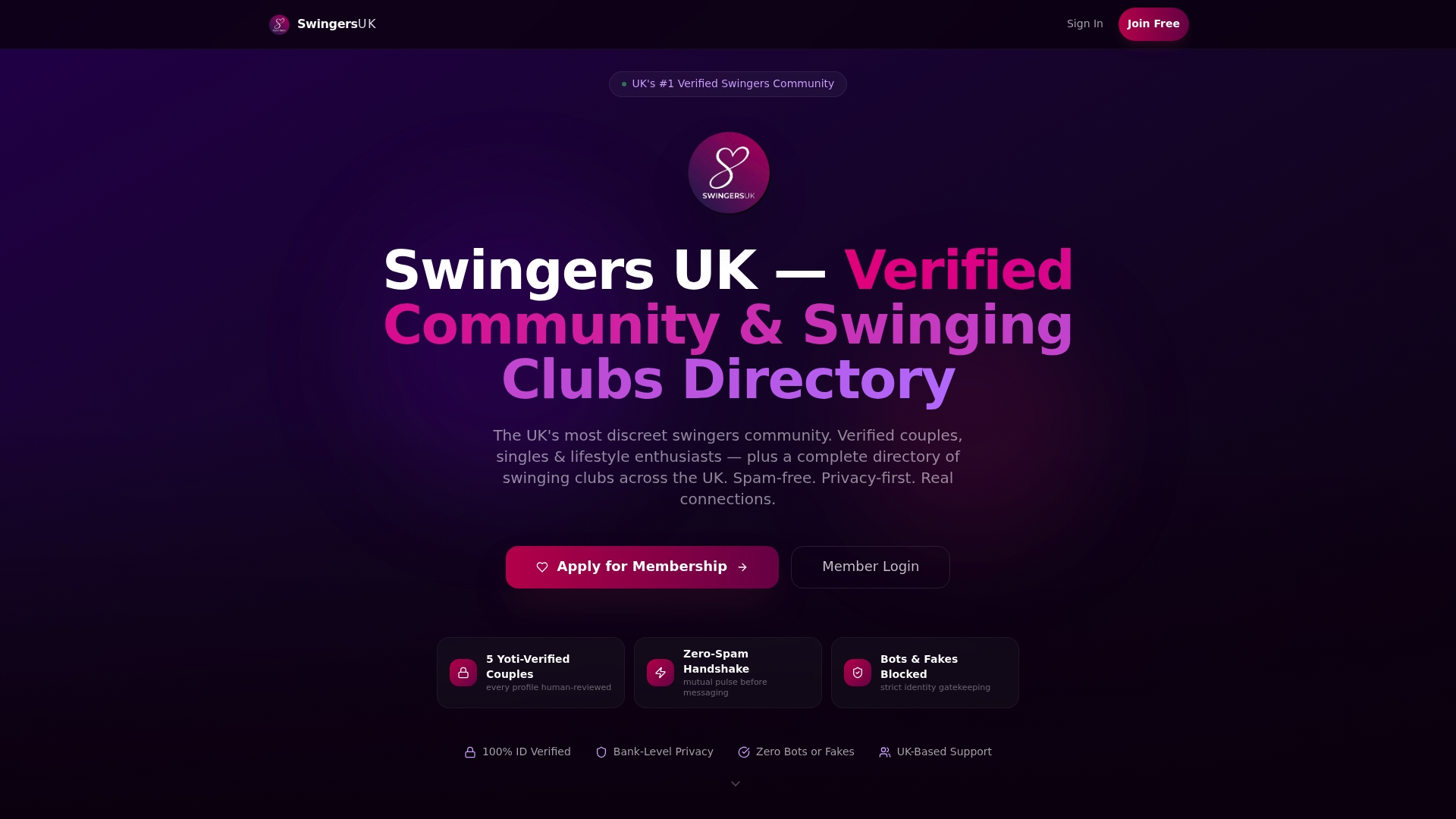
Swingersuk runs verification through both AI and human review, a combination built to keep bots and fake accounts out while still moving genuine members through the queue without unnecessary friction. The AI layer handles the initial checks; a human reviewer steps in for anything that needs judgment, the same tiered approach you’ll see across other platforms in this article.
What sets the experience apart is what happens after approval. The Pulse Handshake System holds messaging until both members show mutual interest, which cuts down on spam contact once you’re verified and active. Paired with ID verification and privacy controls, that means the wait you experience buys you a genuinely quieter, safer space once you’re in. Faster isn’t always better here. Stricter verification takes a bit longer precisely because it’s doing more work to protect the people already inside the community.
Realistic Expectations While You Wait
Simple, automated checks tend to clear fast, and manual, compliance-heavy reviews tend to take longer; that pattern holds across nearly every platform in this article. The single biggest factor in your favor is preparation. A clear photo, matching ID details, and a complete profile before you hit submit will almost always beat any amount of follow-up you do after the fact.
Choose speed when your situation calls for it, like an imminent booking with priority processing available. Choose the platforms with stricter, human-reviewed verification when trust matters more than speed, particularly for communities built around privacy and consent. The wait is rarely wasted time. It’s usually the platform doing exactly what it promised to do before letting you in.
— Daniel
Get Verified and Start Connecting on Swingersuk
Swingersuk is built for members who’d rather wait a little longer for a verified, spam-free community than join something instant and unmoderated. Every profile goes through AI and human review, and the Pulse Handshake System means you won’t be flooded with messages the moment you’re approved, only genuine mutual interest.
If a verification-first platform sounds like the right fit, start with the ID verification page to see exactly what documents and photos you’ll need to submit. Once you know what to expect, check the pricing page to compare membership tiers and what premium access includes. Getting your documents right the first time is still the fastest route through review, on Swingersuk or anywhere else.
Sources
- Understand the verification process - Microsoft Partner Center
- Verify your business with a video recording - Google Business Profile Help
- How long will it take Rover to review my profile? – Help Center
- How long will it take to verify my profile? - Getaround Help
- What is Selfie Verification? - Hinge Help
FAQ
How long does it take for a social platform to approve a post?
Most content moderation on major platforms happens automatically within minutes, though flagged posts can take longer if they’re routed to a human moderator. This differs from profile verification, which typically involves identity documents rather than content review, so the two timelines shouldn’t be confused.
How long does profile verification take on dating platforms?
Selfie-based biometric checks on dating apps typically clear in under 24 hours, according to Hinge’s own verification policy. Platforms with additional identity or compliance checks, including background verification some dating and lifestyle communities use, can take longer depending on how many manual steps apply.
What does “pending” mean on my profile status?
Pending usually means the platform is still processing your submission, or it’s waiting on you to provide something clearer. Checking your dashboard banners and email notifications is the most reliable way to tell which situation applies to your case.
Why was my profile sent to manual review instead of approved instantly?
Automated checks flag certain issues automatically, including a name that doesn’t match your ID, a photo that appears edited, or unclear document images. Once flagged, your profile moves to a human reviewer, which extends the timeline from minutes to potentially several business days.
How does Swingersuk’s verification process affect approval time?
Swingersuk combines AI screening with human review, so most profiles move through both an automated first pass and a manual check before approval. This layered approach takes a bit longer than a purely automated system, but it’s part of how the platform keeps fake accounts and bots out of the community.
What should I do if my approval takes longer than expected?
Check your account dashboard and email first for any request for additional information, since incomplete submissions are a common cause of delay. If nothing’s pending on your end, contact support with your account details, submission date, and any error screenshots so they can locate your case quickly.