Private Photo Albums: 3 Protections Swingers and Daters Need
Private Photo Albums: 3 Protections Swingers and Daters Need
Private, members-only photo albums on a verified dating or swinging platform are the safest practical way to share intimate images with a match. That safety depends on three things working together: identity verification on both sides, pre-send hygiene on every image, and mutual consent on retention. Screenshots and deliberate redistribution remain risks no setting can fully close, which is exactly why the controls below matter.
TL;DR:
- Private photo albums that require mutual interest and verification significantly reduce the risk of unauthorized access, but screenshot and redistribution remain inherent risks.
- Preparing images by cropping identifiable features, neutralizing backgrounds, stripping metadata, and testing sharing reduces accidental exposure before sending intimate photos.
- Platforms with mandatory identity checks tied to album access offer stronger privacy protections compared to apps where verification is optional or superficial.
- Using ephemeral photos and setting access windows increase sharing confidence, but determined bad actors can still capture images with second devices.
- Checking app-specific privacy settings, device backup controls, and verifying encryption ensures your private images remain safer outside trusted platforms.
Table of Contents
- What Private Photo Albums Dating Features Actually Do
- How Do You Prepare A Photo Before Sharing It Privately?
- Which App Settings Should You Check Before Sharing?
- Why Does Identity Verification Matter For Trust?
- What Are The Legal Limits On Sharing Intimate Photos?
- How Do You Set Boundaries With A New Match?
- Do Private Albums Actually Work In Practice?
- How Do Dating Platforms Compare On Photo Privacy?
- What Swingers UK Gets Right About Verified Private Sharing
- Ready For Verified, Private Photo Sharing?
- Sources
What Private Photo Albums Dating Features Actually Do
A private album isn’t just a folder marked “hidden.” On a well-built platform, it’s a permissions system that decides who can ever load the image in the first place, before pixels even reach a screen.
Most platforms build access around a handful of gates. Mutual consent sits at the center: both people typically need to approve contact (Some platforms call this pattern the Pulse Handshake) before either can request access to a private album. From there, you’ll usually see:
- Approved lists that name exactly which matches can open an album, revocable at any time
- Passworded or view-only links for sharing with a group or event circle
- Time-limited viewing windows that close access automatically after a set period
- Ephemeral or self-destruct photos that disappear after being viewed once or after a countdown
Ephemeral sharing isn’t just a gimmick. A randomized field experiment covering more than 70,000 users found that self-destructing photos measurably increased users’ willingness to disclose personal images and boosted match engagement, because people share more openly when they trust the image won’t linger indefinitely.
None of this replaces reading the fine print. Before you rely on any album feature, confirm in the platform’s privacy policy whether images are encrypted at rest, whether the app flags or blocks screenshots, and how long deleted photos actually persist on backup servers. “Private” should mean something specific, not a marketing adjective.
How Do You Prepare A Photo Before Sharing It Privately?
Treat every intimate photo like it might outlive the conversation it was sent in, because sometimes it does. A short routine before you hit send closes most of the avoidable risk.
- Crop out your face or any identifying feature — tattoos, distinctive jewelry, a visible mirror reflection — if the photo doesn’t need to show them.
- Neutralize the background. Street signs, mail on a counter, a laptop screen in the corner: all of it can be searched and traced.
- Strip EXIF metadata before you shoot, not after. Photos sent as raw file attachments often retain EXIF data including GPS coordinates, so turn off location services in your camera app first.
- Use the platform’s built-in photo picker instead of attaching the original file. In-app pickers frequently recompress and strip metadata automatically; a raw attachment usually does not.
- Run a test send. Share a neutral, non-sensitive image first, confirm exactly how it appears on the recipient’s end, and agree out loud on when it gets deleted.
Pro Tip: Take the test photo in a completely different room or setting than the one you plan to use for the real image. It confirms your privacy routine works without giving away anything if the test send goes to the wrong person.
Sexting safety guidance consistently points to these same habits as the highest-value ones available, ahead of vaguer advice like “just be careful.” A checklist of concrete pre-send actions beats a general warning every time, because it gives you something to actually do.
Which App Settings Should You Check Before Sharing?
Your phone’s settings matter as much as the dating platform’s. A private album is only as private as the weakest link in the chain that displays it.
Start inside the app itself:
- Turn on private albums or per-contact access controls rather than leaving photos visible to your whole match list
- Use passworded, view-only links for anything shared beyond a single one-to-one conversation
- Set a viewing window with an automatic expiration date rather than an open-ended share
- Confirm the app supports removal-on-request, so you can revoke access the moment a connection ends
Then check your device. Disable lock-screen previews for messaging and dating apps, since a locked phone left on a table still flashes thumbnail previews to anyone nearby. Review your phone’s backup settings too. Operational habits like blocking automatic cloud backups for private albums close a leakage path that most people never think to check, since a photo can vanish from an app while still sitting in an iCloud or Google Photos backup.
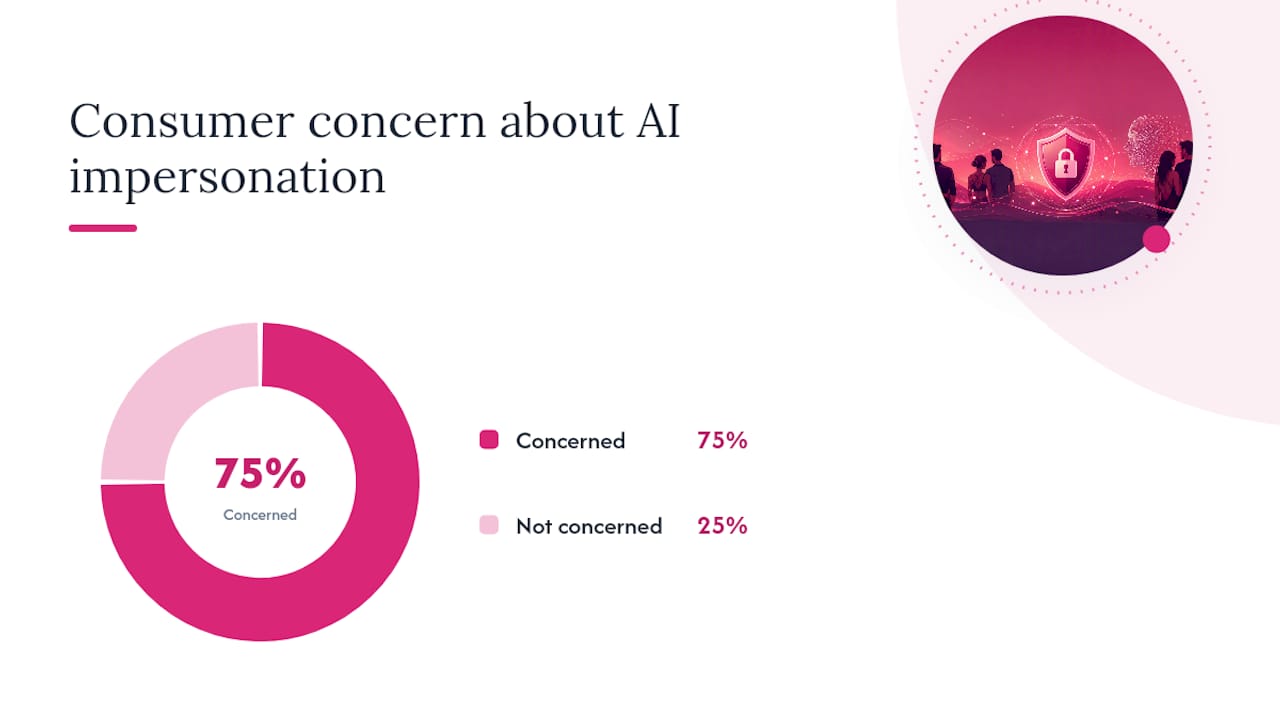
Consumer wariness here isn’t paranoia. Roughly 75% of consumers fear bots or fraudsters using AI to impersonate real people on digital platforms, which is precisely why screenshot-notification features and EXIF-stripping on upload have become baseline expectations rather than premium extras.
Why Does Identity Verification Matter For Trust?
Verification isn’t a one-time box you tick at signup. Used properly, it’s a governance control that platforms should reapply at moments of risk, called step-up verification, tied to moderation and account lifecycle events rather than a single onboarding checkbox.
Assurance levels vary a lot between methods:
- Selfie-photo matching confirms a face resembles a profile photo, which is a low bar, easy to spot-check but also easy to spoof with an old picture
- Biometric liveness checks require a live, moving face, ruling out static photos and most deepfake attempts
- eID or NFC document verification ties an account to a government-issued ID, the highest assurance tier currently in common use
Biometric checks that combine liveness with document verification are increasingly recommended as the higher-assurance option for cutting down impersonation and romance-scam risk. The payoff shows up in the numbers: platforms that rolled out automated or biometric verification reported measurable increases in trust-and-safety scores and fewer support tickets tied to fake profiles. Before trusting any platform with intimate photos, check whether verification is required for every member or optional, and whether suspicious activity triggers a fresh verification step.
What Are The Legal Limits On Sharing Intimate Photos?
Non-consensual distribution of intimate images is a criminal offense in most jurisdictions, not just a violation of app terms. If someone threatens to share your photos without permission, stop engaging, save screenshots of the threats as evidence, and report through both the platform and local law enforcement.
Never share or request images of anyone under 18, and treat any doubt about a match’s age as a reason to stop and verify through the platform’s own age-safeguard tools first. When in doubt, the safest move is always the one that leaves a paper trail: report, document, and let the platform’s moderation team and the authorities take it from there.
How Do You Set Boundaries With A New Match?
Agreeing on ground rules out loud, before the first photo is sent, prevents almost every dispute that follows. A few short scripts make this easy instead of awkward.
- Requesting deletion: “Can you delete that album after you’ve seen it? I’ll do the same on my end.”
- Setting a viewing window: “I’ll set this to a 48 hour view, then it disappears automatically.”
- Confirming non-redistribution: “These stay between us, no screenshots, no forwarding, agreed?”
A simple cadence helps too: review and delete shared albums every 30 days for active conversations, or every 90 days for ongoing connections you check in with less often. If a match won’t confirm a deletion request or gets defensive about it, that’s your signal to rescind access immediately rather than wait and see. Persistent pressure after a clear “no” is when reporting tools stop being optional.
Do Private Albums Actually Work In Practice?
The pattern that shows up again and again among couples and singles using verified swinging platforms isn’t dramatic. It’s quieter than that: people report feeling able to share honestly because the access controls are visible and specific, not vague.
A couple exploring group meetups, for instance, might keep a shared album gated to a short list of mutually verified matches, with viewing windows reset after each event they attend. Singles new to the lifestyle often describe the identity-verification step itself as the thing that let them relax, since it filters out the anonymous accounts most likely to misuse an image. The common thread across these patterns is that privacy tools only build confidence when members understand exactly what each control does, not just that a padlock icon exists somewhere in the settings menu.
This is also where ephemeral sharing earns its keep in practice. Knowing a photo has a countdown attached changes how people share, and the field-experiment data on disclosure and engagement backs that up directly. What it does not do is prevent someone from photographing their screen with a second device. Disappearing messages and screenshot alerts cut down on casual, low-effort persistence. They don’t stop a determined bad actor, and no platform should claim otherwise.
How Do Dating Platforms Compare On Photo Privacy?
Photo privacy features vary sharply across the dating and swinging space, and the differences usually come down to how seriously a platform treats verification as a prerequisite rather than an afterthought.
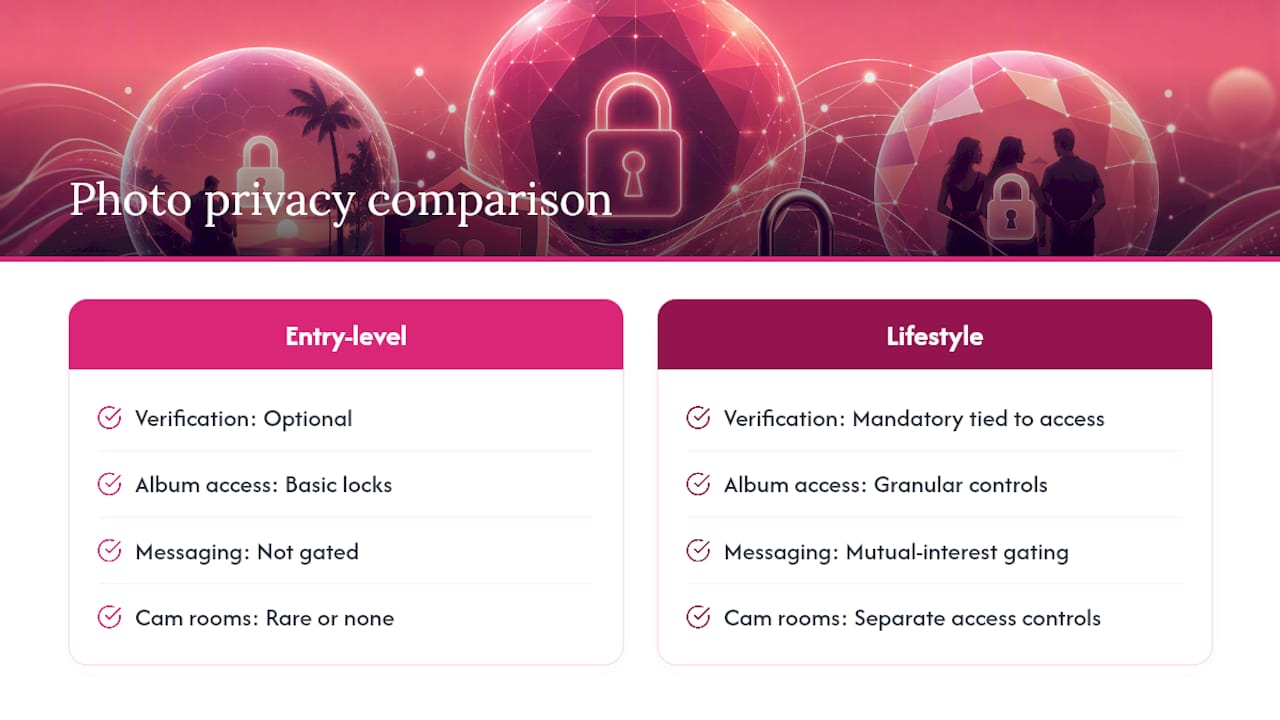
Entry-level dating apps often bolt privacy features onto a broadly public structure. Albums might be lockable, but verification is frequently optional, which means a “private” photo can still land in front of an unverified or anonymous account. Mainstream apps built primarily for casual dating tend to prioritize discovery and matching volume over granular access controls, so private album features, when they exist, are usually basic: a lock icon, maybe a passworded link, rarely a full permissions system.
Platforms built specifically around the swinging and lifestyle community, by contrast, tend to treat verification and private sharing as core to the product rather than a bolt-on feature. Some platforms build around mandatory identity checks before members can request album access, mutual-interest messaging that gates contact before any photo request happens, and private cam rooms with their own separate access controls for real-time sharing. The practical difference for readers is this: a platform where verification is mandatory and tied to every access request will always offer stronger real-world protection than one where it’s an optional toggle buried in settings.
What Swingers UK Gets Right About Verified Private Sharing
Some platforms operate under the idea that privacy and verification aren’t separate features, but intertwined. Profiles may go through identity checks combining AI and human review, and the Pulse Handshake System means no one can request access to a private album or start a conversation without mutual interest confirmed first.
Members get private cam rooms alongside secure photo sharing, both gated by the same verification layer that keeps fake accounts out. If you want to see exactly how the checks work before you rely on them, the identity verification process is worth reading in full.
— Daniel
Ready For Verified, Private Photo Sharing?
Some platforms provide mandatory identity verification tied to every private album request, not an optional setting buried three menus deep, which offers stronger privacy protections. On platforms where verification is optional, you’re trusting a padlock icon; here, you’re trusting a system that confirms who’s actually on the other side before a single photo gets shared.
Users may get access to private, gated photo albums, region-based cam rooms for one-to-one or group sessions, and systems that require mutual interest before messaging or access requests. Profiles may be subject to AI and human-reviewed identity checks to reduce anonymity.
If you’re ready to see the difference verified sharing makes, check the membership options to unlock advanced privacy controls and start connecting with verified matches on your terms.
Sources
- Three quarters of Brits fear fraudsters using AI to outsmart banks, new research finds
- Enhancing user privacy through ephemeral sharing design: experimental evidence from online dating
- Building trust with the Feeld dating app: How a leading platform protects its community - Veriff
- Photo privacy tips for online dating — ExifVoid