4 Dating Apps That Block Screenshots and How to Protect Yourself
4 Dating Apps That Block Screenshots and How to Protect Yourself
Badoo, Tinder, Bumble, and Pure all have some version of screenshot protection or notification built into their apps. Badoo blocks or warns about screenshots depending on OS and warns users on iOS. Tinder blocks screen capture on select profiles in certain regions. Bumble can notify users when a chat screenshot happens in some contexts, and Pure suppresses screenshots in chats while alerting both sides. None of this makes your conversations screenshot-proof. Anyone with a second phone camera can still capture your screen, and coverage varies by region and OS version. Check the shortlist below, or skip straight to the privacy steps that work regardless of which app you use.
TL;DR:
- Screenshot protection features vary widely across dating apps, and none can fully prevent casual photography with a second device.
- Android apps often block screenshots using the FLAG_SECURE flag, but iOS relies on detection rather than prevention, making it less effective.
- Regional updates, app versions, and OS changes mean screenshot protection capabilities can differ or break down unexpectedly over time.
- Using privacy settings, limiting profile details, and sharing sensitive content only within secure app features significantly enhance personal privacy.
- Combining app-level protections with proactive privacy habits and identity verification helps reduce exposure and potential abuse.
Table of Contents
- Block Screenshots on Dating Apps: A Quick Shortlist
- How Screenshot Blocking Actually Works (and Why iOS and Android Differ)
- Where Screenshot Protection Breaks Down
- How to Protect Your Privacy Beyond App Features
- How Swingersuk Reduces Exposure Before It Starts
- The Honest Take on Screenshot Protection
- Consider a Community Built Around Consent, Not Just Capture Prevention
- Sources
- FAQ
Block Screenshots on Dating Apps: A Quick Shortlist
You don’t need to guess which apps take screenshot privacy seriously. Here’s what each one actually does, based on vendor statements and reporting.
- Badoo: Badoo rolled out a Screenshot Block feature that behaves differently depending on your phone. On Android, it blocks the screenshot entirely. On iOS, Apple’s system doesn’t allow full blocking, so Badoo instead shows a warning when it detects a screenshot attempt, according to reporting on the launch. The feature was built specifically to stop private photos sent in chat from being saved and circulated without consent.
- Tinder: Tinder documents screenshot and screen recording protection for profile photos in select regions, with behavior that differs between Android and iOS. Tinder’s own support page is blunt about the limits: no technology stops someone from pointing an external camera at their screen. For chat conversations specifically, Tinder generally still recommends taking a screenshot yourself if you need to report harassment or abuse.
- Bumble: Bumble has experimented with notifying users when the other person screenshots a chat, though this coverage is inconsistent and not universally rolled out. It’s a lighter touch than an outright block. It tells you something happened rather than preventing it.
- Pure: Pure markets itself around ephemeral, disappearing content, and its screenshot handling reflects that priority. According to the company’s own statements, screenshots taken inside chats get suppressed, and the app notifies participants when an attempt is detected.
Availability shifts constantly. App updates, regional rollouts, and OS-level changes from Apple and Google mean the feature that works today on your phone might behave differently after your next update. Treat this list as a snapshot, not a permanent guarantee.
How Screenshot Blocking Actually Works (and Why iOS and Android Differ)
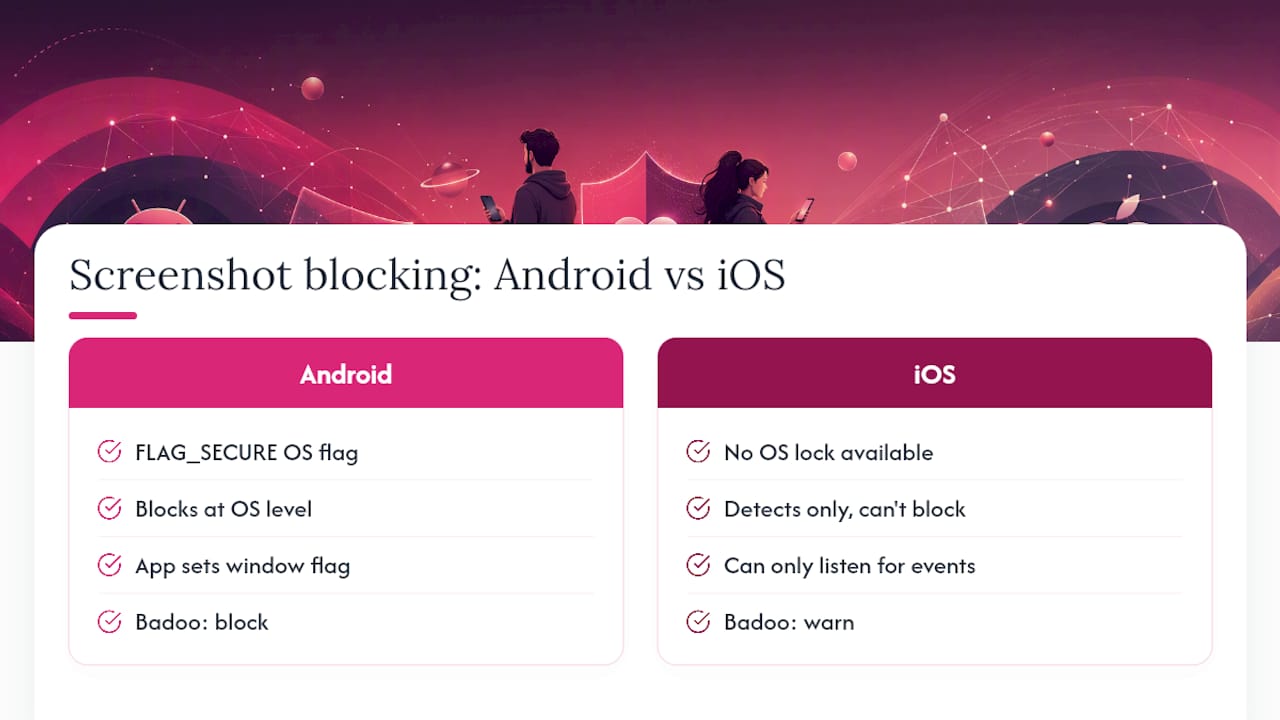
Screenshot blocking isn’t magic. It leans on a specific piece of Android engineering called FLAG_SECURE. When a developer sets this flag on a window, the Android system compositor renders that window as solid black in any screenshot or screen recording, according to a technical breakdown of the flag. Standard screenshot tools can’t see past it because the block happens at the operating system level, not inside the app itself.
iOS doesn’t offer an equivalent system-wide lock. Apple gives developers event listeners that can detect when a screenshot happens, but detection isn’t prevention. That’s why Badoo can block on Android but only warn on iOS, and why Bumble’s approach leans on notification rather than a hard stop.
Cross-platform apps often lean on third-party code, like the react-native-capture-protection library, to bring some of this behavior to both operating systems at once. Even then, results depend heavily on how each app implements it.
Where Screenshot Protection Breaks Down
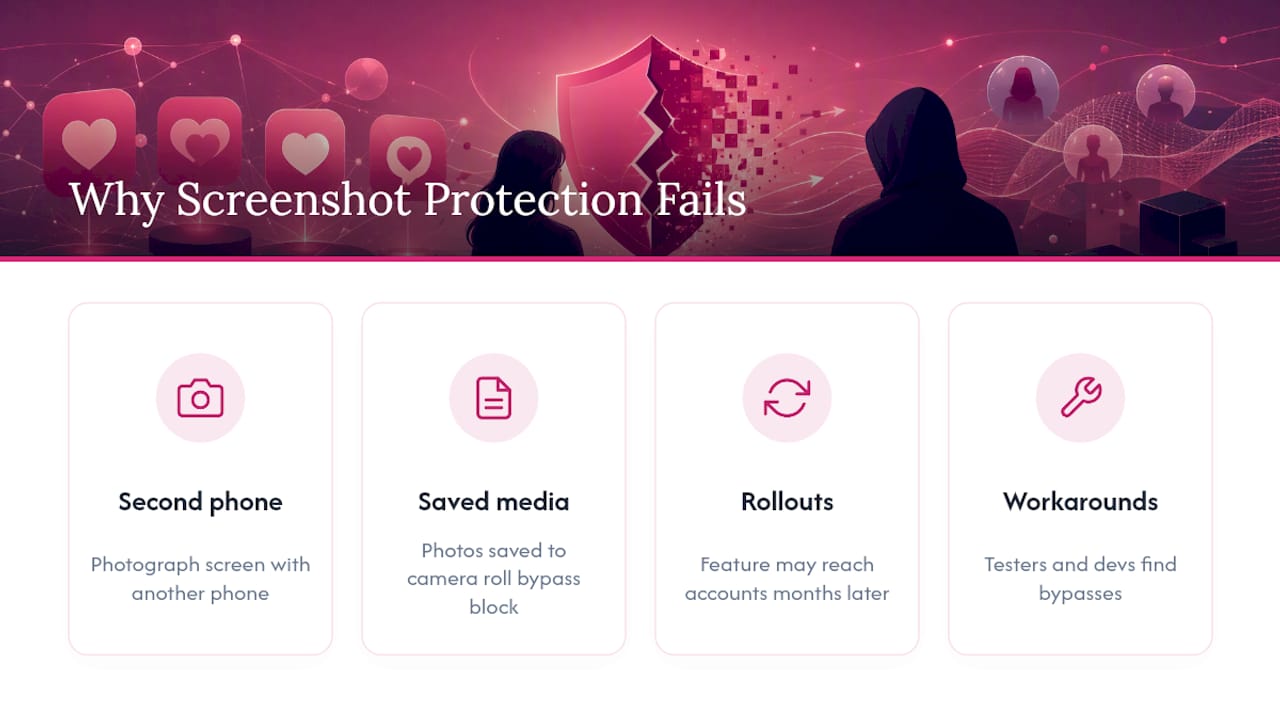
App-level blocking only guards the screen itself. It does nothing to stop someone from pointing a second phone at their screen and photographing the conversation the old-fashioned way. That workaround has been around since screenshot blocking existed, and no software fix touches it.
Content that leaves the protected app is just as exposed. If someone saves a photo to their camera roll before a block kicks in, or copies text into a messaging app without screenshot protection, the safeguard never had a chance to work. Regional rollouts add another wrinkle: a feature announced in a press release might not reach your account for months, if it reaches it at all.
Reddit threads asking which dating apps prevent screenshots are full of users who assumed a feature was universal, only to find it missing on their device. QA testers and developers can usually find workarounds too. Assume any protection you encounter is a deterrent, not a lock.
How to Protect Your Privacy Beyond App Features
Screenshot blocking is one layer. The stronger layer is what you control before a screenshot is even possible.
- Keep your profile lean. Skip identifiable details like your workplace, gym schedule, or street-level location shots. The less specific information floating in your profile, the less useful a leaked screenshot becomes to anyone.
- Tighten your permissions. Go into your phone settings and restrict precise location, limit photo library access to selected images only, and opt out of behavioral ad tracking where the option exists. Privacy advocates at the EFF specifically recommend this permission hygiene precisely because app-level blocking can’t cover everything.
- Use disappearing photo features when they’re available, and keep sensitive media inside the app’s own secure sharing tools rather than exporting it to text or email.
- Document responsibly if something goes wrong. If a match harasses you or shares your content without consent, take your own screenshot with a timestamp visible, then report it through the app’s official tools rather than just blocking and moving on.
Pro Tip: Before you share anything sensitive, test your privacy settings first, either on a secondary account or by asking a trusted friend to check what they can see on your profile. Settings you assume are private sometimes aren’t.
If you’re managing what photos are visible on a business or event profile, restricting your photo library access to only the images you intend to share is one of the simplest habit changes you can make.
How Swingersuk Reduces Exposure Before It Starts
Screenshot protection matters most when strangers can message you freely and pressure you into sharing something you’ll regret. Swingersuk tackles that problem earlier in the chain. Every profile goes through AI and human review, which cuts down the fake accounts and bots that drive a lot of unsolicited image requests in the first place.
A mutual interest requirement means nobody can message you until you both show interest, so you’re not fielding cold approaches from accounts you never chose to engage with. Additional features like private cam rooms, incognito browsing, and secure sharing controls give more control over who sees your content and when, reducing the chances of anything ending up somewhere you never intended.
The Honest Take on Screenshot Protection
Screenshot blocking is a genuine improvement over having none at all, and platforms rolling it out deserve credit. But treating it as a guarantee is a mistake. It’s one layer in a stack that has to include permission hygiene, careful sharing, and picking platforms where fewer strangers can reach you unsolicited in the first place. Combine the technology with better habits, or the technology alone will let you down eventually.
— Daniel
Consider a Community Built Around Consent, Not Just Capture Prevention
Screenshot blocking tries to fix a problem after the fact. Swingersuk is built to reduce the problem before it starts. ID verification filters out fake accounts and catfish profiles before they ever reach your inbox, so the people messaging you are who they say they are.
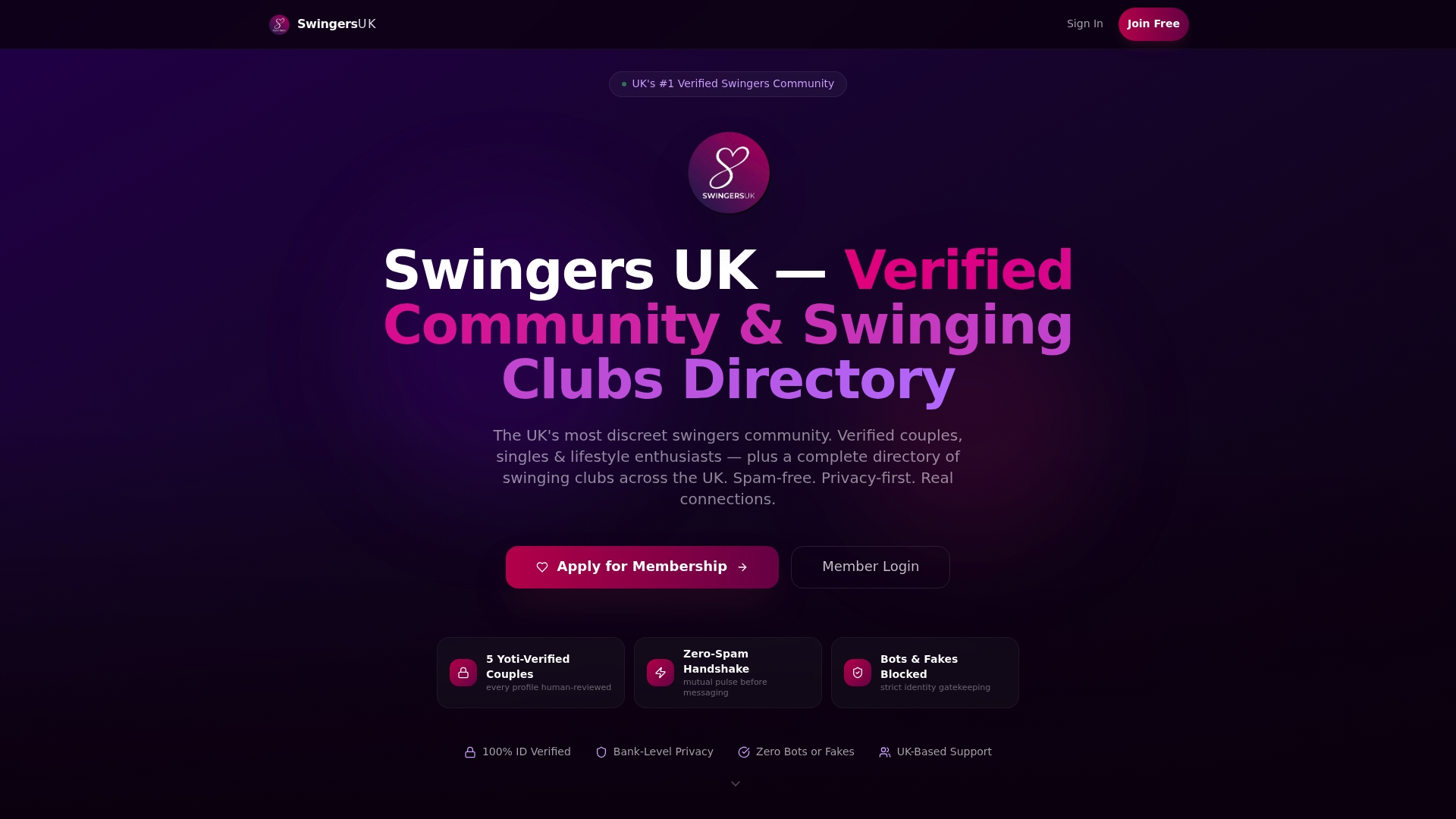
The verification process pairs with a mutual interest system, meaning messages only start once both sides show mutual interest. No cold pitches, no pressure to share something before you’re ready. Add private cam rooms and incognito browsing, and you get a lot more control over your own content than a screenshot notification can offer after the fact. If you’re ready to see how ID verification works or want to browse membership options, visit the Swingersuk platform and check out what free and premium tiers include before you commit.
Sources
- Screenshot and screen recording protection (Tinder Help Center)
- Protect your privacy on Bumble (EFF commentary)
- How to prevent Android screenshots — FLAG_SECURE explanation
- yongb2n/react-native-capture-protection (GitHub)
FAQ
Which dating apps block screenshots?
Badoo, Tinder, Bumble, and Pure each offer some form of screenshot protection or notification, though the exact behavior differs by app, region, and whether you’re on Android or iOS.
Can dating apps tell if you take a screenshot?
Some can. Apps using event listeners or Android’s FLAG_SECURE can detect or block capture attempts, but detection reliability varies and isn’t consistent across every app or device.
How do people get around apps that block screenshots?
The most common workaround is photographing the screen with a separate camera, which no in-app software can prevent, along with copying content into an unprotected app before a block ever engages.
Why am I suddenly getting spam from dating apps?
Spam usually follows shared or leaked contact details, fake profile interactions, or third-party data breaches rather than screenshot activity itself. Choosing platforms with stronger identity verification, like ID-verified profiles, tends to cut down on this kind of unwanted contact.